A New Inventory System
March 02, 2018
Welcome back! I have recently just made an inventory system for the game. I wanted to program some part of the game that didn’t rely too much on the game engine being finished so I thought I would do the inventory system. This is basically the part of the game that handles what objects have been picked up, how many of that object there are and the name and description of the object. I may need to make some further tweaks to this system but in its current stage it does the job very well.
In terms of code, this system isn’t particularly complicated as there are simply just two different classes. One of them is called ‘item’ and the other called ‘inventory’; these are objects that are created by the game to create the inventory. An ‘inventory’ object is created and then ‘item’ objects are created and then inserted into the ‘inventory’ object.
Below is a screenshot of me testing out that this inventory system actually works.
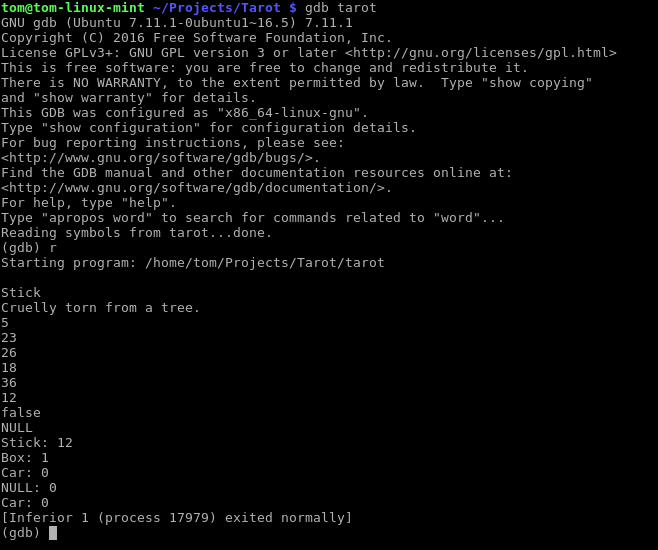
It looks like a lot of text but most of it can be ignored. The most meaningful part of the text is about halfway down where you can see the word ‘Stick’ and then its description underneath it reading, ‘Cruelly torn from a tree’. Then the various numbers after it is me changing the quantity of the item by simply setting it and then doing mathematical operations to it. Then where it says, ‘false’ is me checking if its value is equal to 13, which it isn’t. The line underneath it stating, ‘NULL’ is me attempting to read an item from the inventory which doesn’t exist so this behaviour is planned. Then the next few lines is me outputting the name of the item and then how much of it there is. Then I remove the Box item and attempt to output it, but gives the result of ‘NULL: 0’.
I have also partially implemented a mechanism that checks whether the quantity of an item is less than or equal to 0, then if it is then it removes it completely from the inventory. I do check this but it shows ‘Car: 0’ still showing that it hasn’t been removed; the program did in fact check this item but I had also added the option for an item to remain permanently in the inventory no matter what its quantity is, ‘Car’ is in fact one of these items. The ability to do that may or may not be useful in the game but it is nice to have, could even include some kind of easter egg using this mechanism.
Underneath is some of the code that I was using to test this system to give you an idea on how accessing and editing items is using the inventory system.
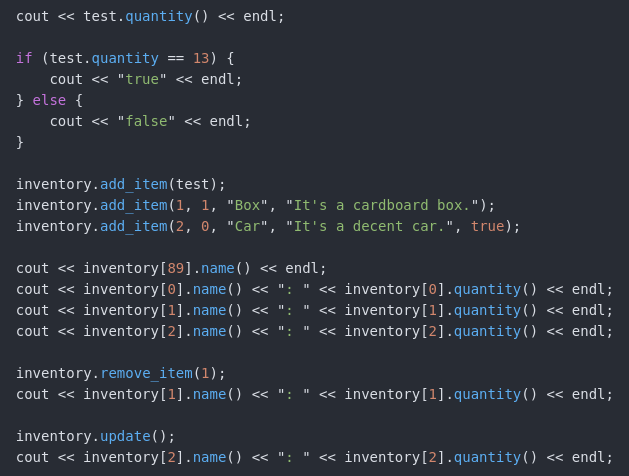
As complicated as it might look, it is actually quite simple to use. The method to output text is quite a mouthful so that makes it look even more complicated than it really is. Anyway, stay tuned for further updates!
Thanks for reading :)
Tom